Skip to content

How does TrueWeight work?

TrueWeight measures the actual workload of every matter.

A file count tells you how many matters a solicitor holds. It does not tell you how big a matter is and when the solicitor will get busy with the matter. TrueWeight tracks this for every matter and at the same time tracks the trauma exposure risk that comes with the work.

Problem - Personal Bias Complexity is assessed differently from one manager to the next.

Consistency - The Matter Assessment Tool assesses every matter the same way

When a matter arrives, the Matter Assessment Tool takes what is known about it. Some of this comes from your case system and some is entered by the manager. It then recommends a workload weighting, a complexity and risk rating, and a trauma exposure rating.

The complexity and risk rating also recommends the level of solicitor the matter should go to. The manager can agree with each recommendation or override it with a short reason.

Every matter is assessed the same way, so assessments are consistent across teams and there is less room for personal bias. This workload weighting is the starting point for Dynamic Workload Calculations.

The tool is built with your own practitioners and tuned until it matches their judgement. It takes a few minutes to complete and matters can be re-assessed when there are material changes. It can sit inside your case system or in TrueWeight. Some offices start with the Matter Assessment Tool on its own.
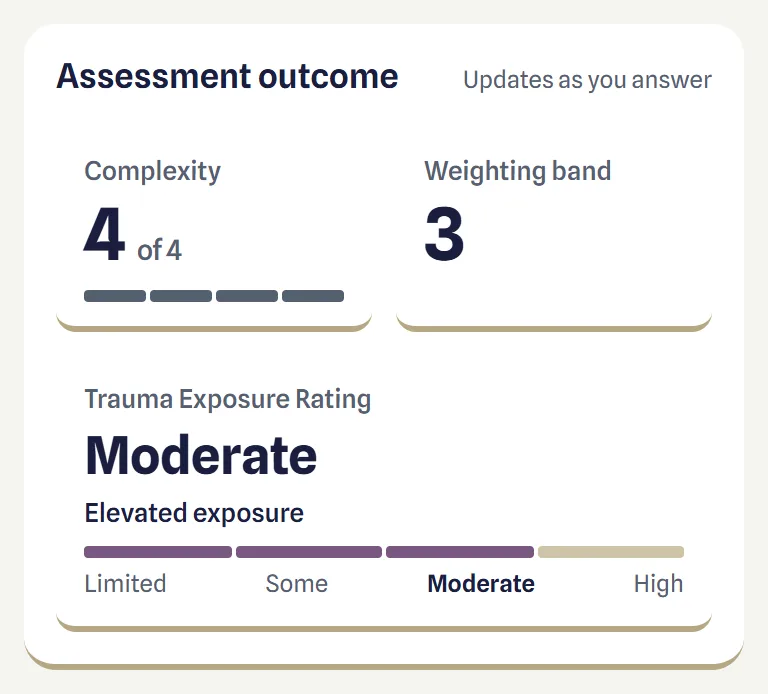
The results panel of the Matter Assessment Tool, showing a workload weighting, a complexity and risk rating and a trauma exposure rating. Illustrative data.
The assessment outcome
Illustrative data

Problem - File counts do not reflect the real effort needed to progress matters.

Workload changes as the matter progresses.

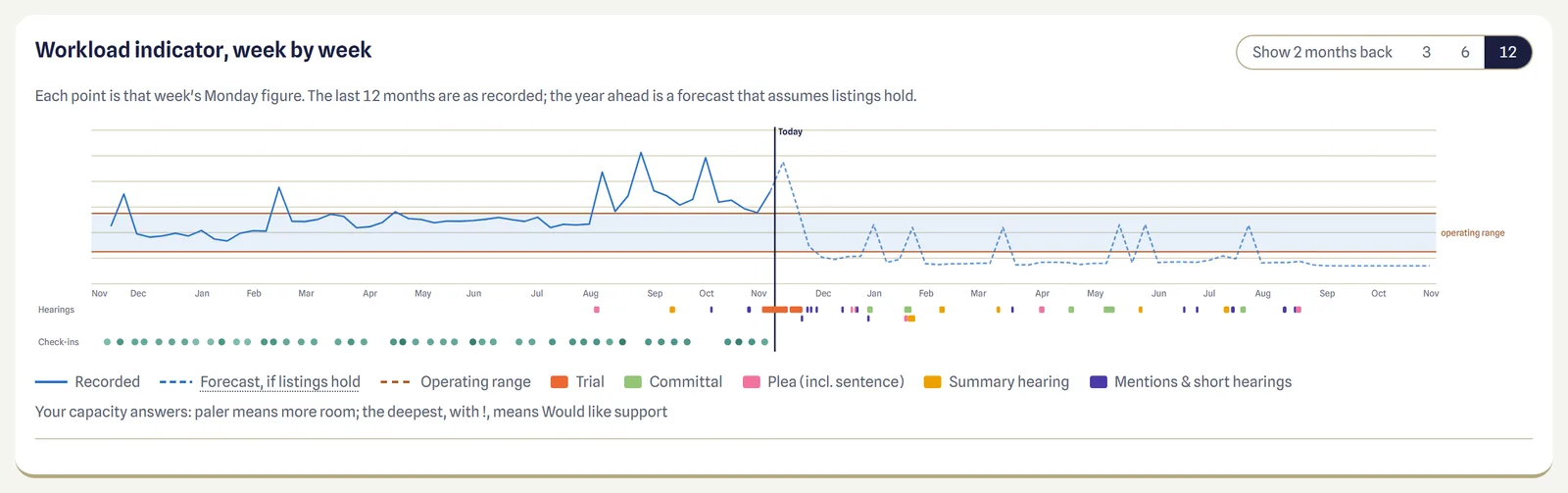
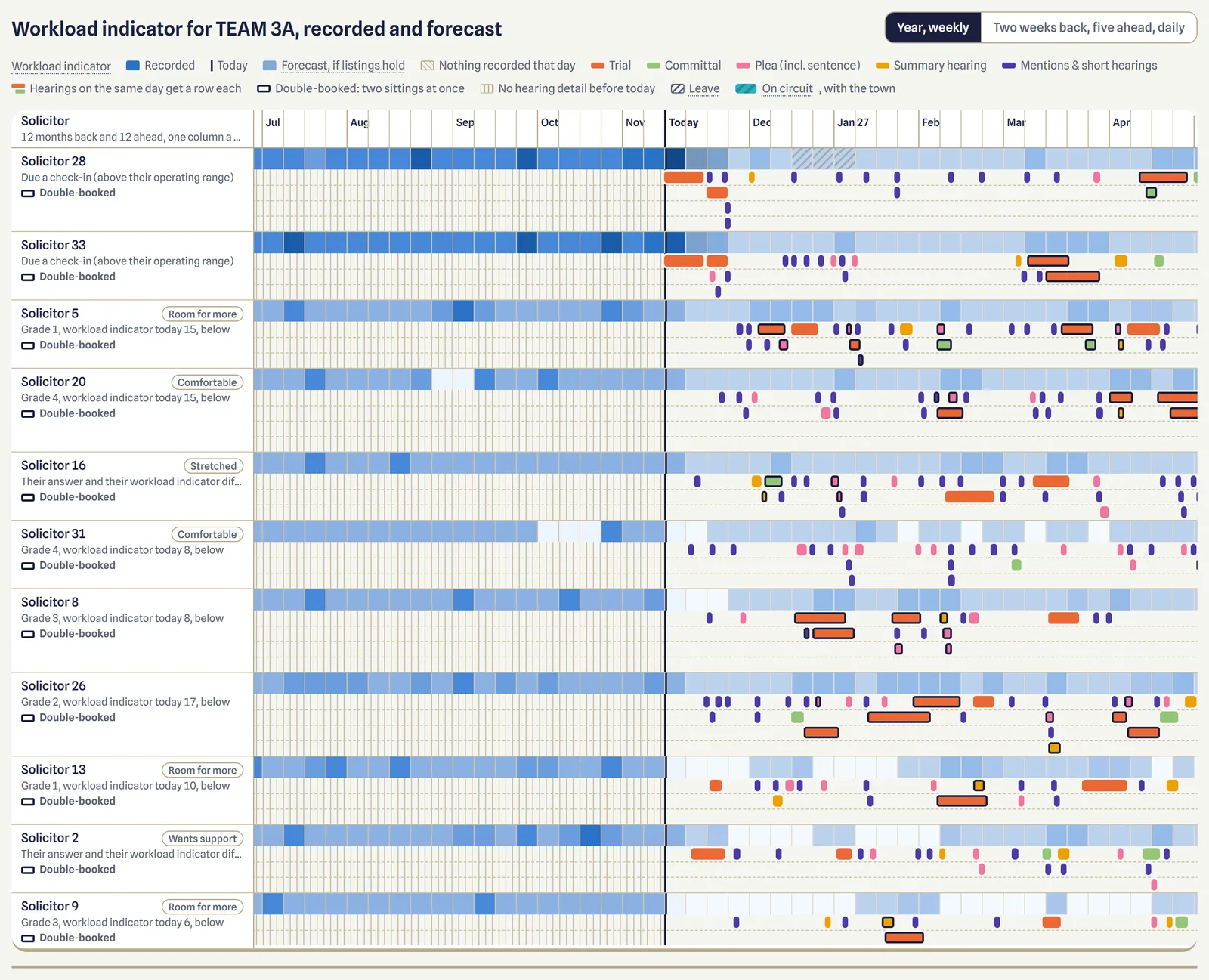
A trial in its final month of preparation takes far more work than the same trial six months earlier. TrueWeight follows each matter as it progresses and updates every solicitor's workload each day.

Each office sets its own ideal operating range. When someone sits above it for a while, it prompts their manager to talk with them.

A team's load across the year in TrueWeight, shown as a timeline for each solicitor with a court lane beneath. Illustrative data.
A team's load across the year
Illustrative data

The level of busyness for a solicitor is hard to predict.

See the workload for the next twelve months.

Listed hearings are plotted for the next twelve months, so a manager can see where two trials collide or a team has a heavy quarter ahead. Projections are labelled "if listings hold" because listings change.

You can look at the whole office, a division, a team or one person. A manager can check a leave request or a proposed trial date against the projection.

A twelve-month projection for one solicitor, with listed hearings marked and the label "if listings hold". Illustrative data.
The year ahead for one solicitor
Illustrative data

Work is unevenly distributed, and some solicitors are overloaded.

Who is best placed for the next matter, and why.

When a new matter arrives, what counts is who will have room during its hearing window. Where no hearing is listed yet, the usual timetable for that kind of matter is used until a real date arrives.

Everything needed to make an informed allocation decision

  • Actual workload and trauma exposure across all team members
  • Court commitments
  • Leave and exceptions

You can see the effect of an allocation or reallocation decision with a click.

Optionally, the benefit of an Allocation Engine

For each new matter, the TrueWeight Allocation Engine can suggest who is best placed to take it, based on your own allocation rules. The reasons are shown and the manager decides.

Your own rules are applied first, such as qualifications, seniority, exclusions, leave and court clashes. Trauma exposure counts as well as workload, so someone already carrying a lot of traumatic work is less likely to be suggested.

It matches the level of solicitor required to carry the matter and what level it should be briefed.

It can also suggest moving work from someone who is overloaded to someone with room.

The manager can override a suggestion and record a short reason, so the office keeps a record of how work was allocated.

Who is best placed, and why
Illustrative data

Exposure to traumatic material has no structured measure.

See where trauma exposure risk is building.

It starts with the matter. Every matter is given a trauma exposure rating when it is assessed. The rating takes account of the type of matter, the material to be reviewed and contact with victims and families.

TrueWeight then looks at each person. It brings together the rated matters they hold now and the ones they have carried in the past. Closed matters are also considered. You can see when several high trauma risk matters are coming to a head together.

Each person's exposure risk is shown in the way your office chooses.

Managers can see who has been carrying the most traumatic work and for how long. They can spread it more evenly, and the next allocation can take it into account.

An individual's exposure is seen only by the people your office policies allow, such as their direct manager or wellbeing officers. Executives see patterns across teams.

More about trauma exposure
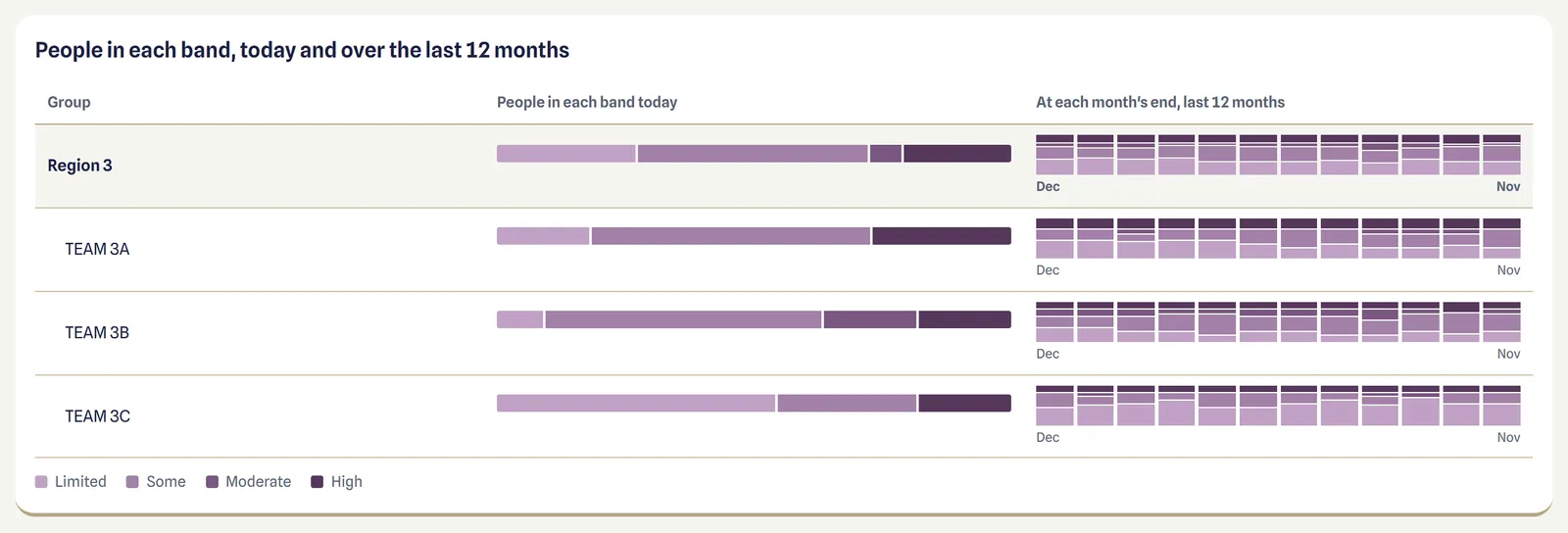
Exposure risk across a region and its teams, shown as a chart of how many people sit in each band, with the bands named in words. Illustrative data.
Exposure risk by band
Illustrative data

It is difficult to justify resources to central agencies.

When resources are not enough, support the case for the people you need.

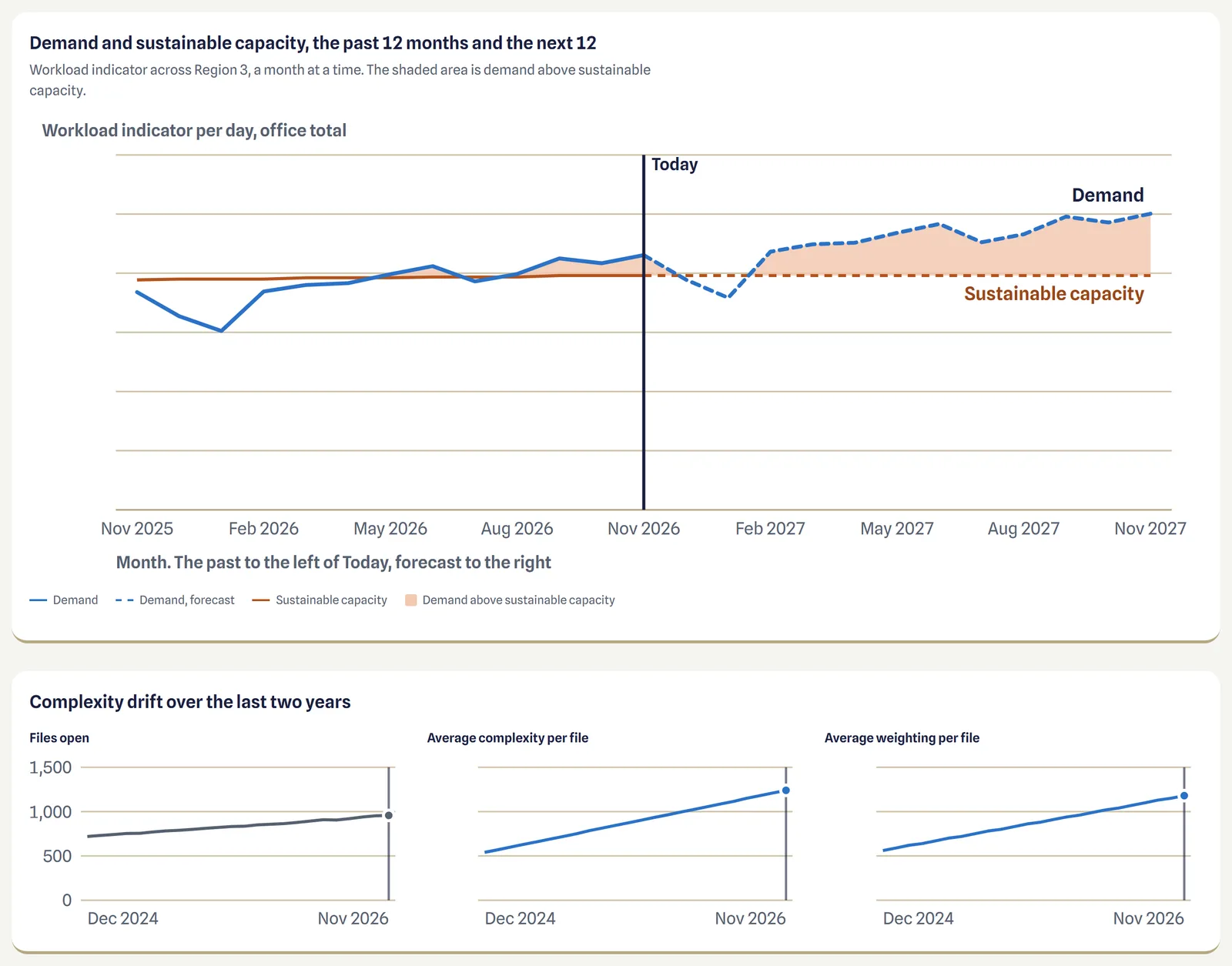
Every matter carries a workload weighting and a projection, so TrueWeight can add up the work coming to each team and set it against the capacity of the people available to do it.

Capacity is the people you have, allowing for part-time work, leave and time away from matters, set against the workload range your office has agreed is sustainable.

Executives can see where demand is running ahead of capacity for each team and division. They can also see when the same number of files is becoming heavier over time.

For the office as a whole, TrueWeight estimates the hours and people the year's work requires. You can compare scenarios, such as a rise in matters received or a change in the law, before they happen. Hours are shown for teams and for the office. They are not shown for an individual.

The result can be set out as a costed capacity statement, which gives you evidence to support a budget bid.

The resourcing picture in TrueWeight, showing the gap between demand and capacity and how the mix of work is changing. Illustrative data.
The resourcing picture
Illustrative data

Who sees what.

WhatSolicitorManaging lawyerExecutive
Own workload and projectionYesYesYes
Team members' workloadNoOwn teamTotals by team
Individual exposure bandOwn onlyDirect reportsNever
Exposure at team level (small groups are not shown)NoOwn teamYes

Choose what your office needs.

TrueWeight is one product made of modules. Each office turns on the ones it wants. Modules marked Core are always on. This is a selection, and the full list is covered in a demonstration.

Assess

  • Matter assessmentCore
  • Pre-filled answers from your case system
  • Agree or override, with a short reasonCore
  • Who may hold it: seniority and sign-off
  • Reassessment when a matter changes

Workload

  • Dynamic workload, updated dailyCore
  • Operating rangeCore
  • Load picture for each solicitor
  • Shared and related matters
  • Circuit and regional work
  • History and trends

Look ahead

  • Twelve-month projectionCore
  • Clash detection
  • What-if: a new matter, a moved hearing, leave

Allocate

  • Best Suited shortlist, with reasons
  • Qualifications and exclusions applied first
  • Rebalancing suggestions
  • Weekly allocation round
  • Allocation register
  • Court board

Psychosocial risk

  • Exposure rating per matterCore
  • Exposure picture per person
  • Team exposure view, with no names
  • Load and exposure together

The person's side

  • Weekly check-in, optional and private
  • Exclusion and qualification lists
  • My view: my week, year and band
  • "This doesn't reflect my experience"

The record

  • Response log
  • Review log
  • Risk register export, with no names
  • Executive assurance report
  • Inspector-ready export
  • Obligations map for your jurisdiction

General information, not legal advice.

Resourcing

  • Demand against capacity
  • Hours for the office
  • Complexity drift
  • Costed capacity statement

Views and reports

  • Role dashboardsCore
  • Past, present and future on one timeline
  • Weekly exception report
  • PDF and spreadsheet export
  • Results in your own systems

Trust and setup

  • Role-based privacyCore
  • Data quality flagsCore
  • Runs in your environmentCore
  • Your settings: words, stages, rulesCore
  • Version historyCore
  • My data request

See it working on illustrative data.